
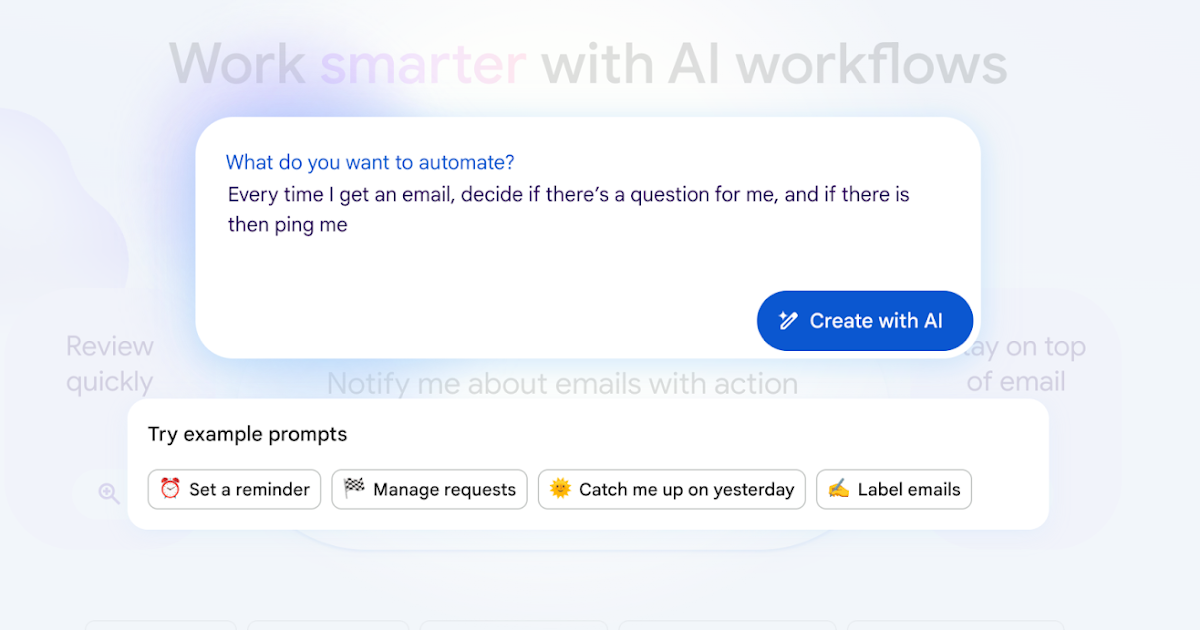



Google has quietly released a feature that shifts the AI narrative from “chatbots that talk” to “agents that work.” It’s called Workspace Studio, and it represents a massive leap in personal productivity.
For years, automation was the domain of developers or complex scripts. Workspace Studio changes that. It allows everyday users to build their own AI assistants using plain English, no code required, directly inside the tools they use daily: Gmail, Calendar, Drive, and Chat.
If you have ever felt buried under administrative busywork, this tool is aimed squarely at you. Here is why it matters and how it works.
The Core Shift: From Rigid Rules to “Reasoning”
To understand why Workspace Studio is significant, you have to look at how automation used to work versus how it works now with Gemini 3.
- The Old Way (Rules-Based): “If the email subject line contains the word ‘Invoice’, move it to folder X.” This is fragile. If a client writes “Bill for services” instead of “Invoice,” the automation breaks.
- The Workspace Studio Way (Reasoning-Based): You tell the agent: “Manage my incoming financial documents.”
Because these agents run on Gemini 3, they can reason through ambiguity. They understand that a PDF attached to an email saying “Here’s the bill” is the same concept as an “Invoice.” They can adapt to new information, read context across your documents, and make decisions rather than just matching keywords.
Real-Life Scenarios: What You Can Build Today
The power of Workspace Studio lies in its ability to chain tasks together. Here are three specific examples of how this translates to actual work.
1. The Intelligent Inbox Guard (Contextual Triage)
Most professionals drown in “FYI” emails. A standard filter can’t tell the difference between a newsletter and a crisis. A Workspace Agent can.
The Prompt:
“Review my unread emails. If a message contains a direct question for me or requires approval, mark it as ‘Action Required’ and ping me in Chat with a one-sentence summary of what is needed. If it is just an update, file it under ‘Read Later’.”
The Result: The agent parses the intent of the email. It distinguishes between a boss saying, “Just keeping you in the loop” (filed away) versus “I need your sign-off on this by 5 PM” (flagged and notified). It prioritizes your attention, not just your inbox count.
2. The Project Orchestrator (Cross-App Automation)
Work rarely happens in just one tab. Usually, a request comes in via Email, needs to be tracked in a Project Management tool, and communicated via Chat.
The Prompt:
“When a client emails about a ‘bug’ or ‘error,’ create a ticket in Jira assigned to the engineering lead. Then, reply to the client confirming receipt, and post the Jira link to the #dev-team Slack channel.”
The Result: The agent acts as the glue between your stack. It extracts the technical details from the email for Jira, matches the tone of your voice for the client reply, and ensures the internal team is alerted in Slack—all without you opening a single tab.
3. The Calendar Defender (Strategic Scheduling)
Your calendar is often a battleground for your time. Workspace Studio can act as your gatekeeper.
The Prompt:
“Analyze incoming meeting invites. If an invite has no agenda or conflicts with my ‘Deep Work’ block, draft a polite decline email suggesting an alternative time next week, and save it to my drafts for review.”
The Result: The agent uses context from your calendar and your priorities to protect your time. It doesn’t just look for free slots; it looks for quality slots, automating the uncomfortable social friction of saying “no.”
Accessibility: Built by You, in Minutes
The “Studio” aspect is designed for non-technical users. You do not need to read API documentation or set up webhooks.
- Plain English Creation: You simply type what you want the agent to do. “Every Friday, look at my sent emails and summarize what I completed for my manager.”
- Template Library: Google provides zero-configuration templates for common needs, such as “Daily Briefing,” “Meeting Prep,” or “Inbox Zero,” which you can use instantly or tweak to fit your style.
- Shareable Assets: Once you build a great agent, you can share it like a Google Doc. This allows teams to scale “power user” workflows across the entire organization instantly.
The Ecosystem: Beyond the Google Garden
Crucially, these agents aren’t locked inside Google. Workspace Studio allows for deep integration with the wider SaaS ecosystem.
- External Connectors: Agents can interact with Salesforce, Asana, Jira, Mailchimp, and more.
- Internal Tools: For the more technically inclined, agents can use Apps Script to call internal APIs or proprietary company databases.
The Bottom Line
In the last 30 days alone, early access users have offloaded over 20 million tasks to these agents.
This feature signals a transition in how we work. We are moving away from manual digital busywork and toward a model where you act as the manager of your workflows, delegating the execution to AI. When you can look at a repetitive, soul-sucking process and simply say, “Gemini, handle this from now on,” you aren’t just saving time—you’re reclaiming your focus.






Leave a Reply